Cloud Booking Software When Island Operations Go Offline
Your booking calendar is full. Staff know their schedules. Customers have appointments confirmed for the afternoon.
Then the office computer stops working or there is an internet interruption at the location. A device becomes unavailable. The team temporarily needs to work from somewhere else. The immediate questions start:
- Who is booked next?
- Which staff member has the appointment?
- Where are the customer's details?
- Do we still have access to today's schedule?
For Cayman salons, spas, gyms, fitness studios, wellness canters, and other appointment-based businesses, appointments should not depend on one computer sitting behind reception.
This is where cloud booking software becomes useful. Cloud-based storage can keep business information centrally stored and accessible from internet-connected devices, while backups can help protect data against events such as hardware failure. Cloud storage features also support real-time access, automatic synchronization, security controls, and regular backups.
The goal is simple: when one part of your normal working setup becomes unavailable, your booking information should not disappear with it.
What Happens When the Front-Desk System Becomes Inaccessible?
Many businesses do not think about access until they lose it. Imagine a busy Cayman salon where the main reception computer contains the information employees depend on throughout the day.
- At 11:00 AM, the device develops a problem.
- The salon still has customers arriving.
- Staff still need to know their schedules.
- Reception still needs appointment information.
If critical information is tied to one device or locally stored file, the disruption quickly becomes a business problem.
One Device Should Not Hold the Whole Day Together
A traditional local setup can make a business dependent on a particular device or physical location. Cloud appointment software changes where that dependency sits.
With information stored in the cloud and accessible through supported internet-connected devices, authorized users can retrieve necessary information without being tied to the original office computer. Dotbooker describes its cloud storage as providing access to important information from internet-accessible devices whether employees are in the office, outside it, or at home.
For a Cayman service business, that can make temporary device problems much easier to work around.
Cloud Booking Software Gives Your Schedule Somewhere Safer to Live
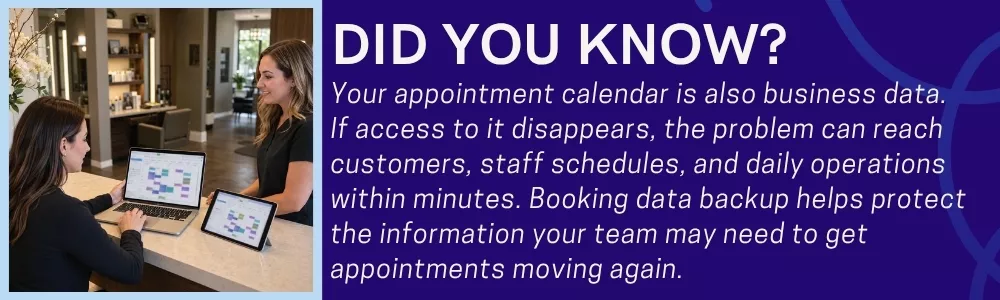
Think about how valuable your booking data is. It can include customer details, appointment times, staff schedules, service information, and other records used throughout the day.
Losing access to that information can affect far more than the calendar. Cloud booking software helps move important business information away from dependence on local hardware alone.
Your Booking Data Follows the Business
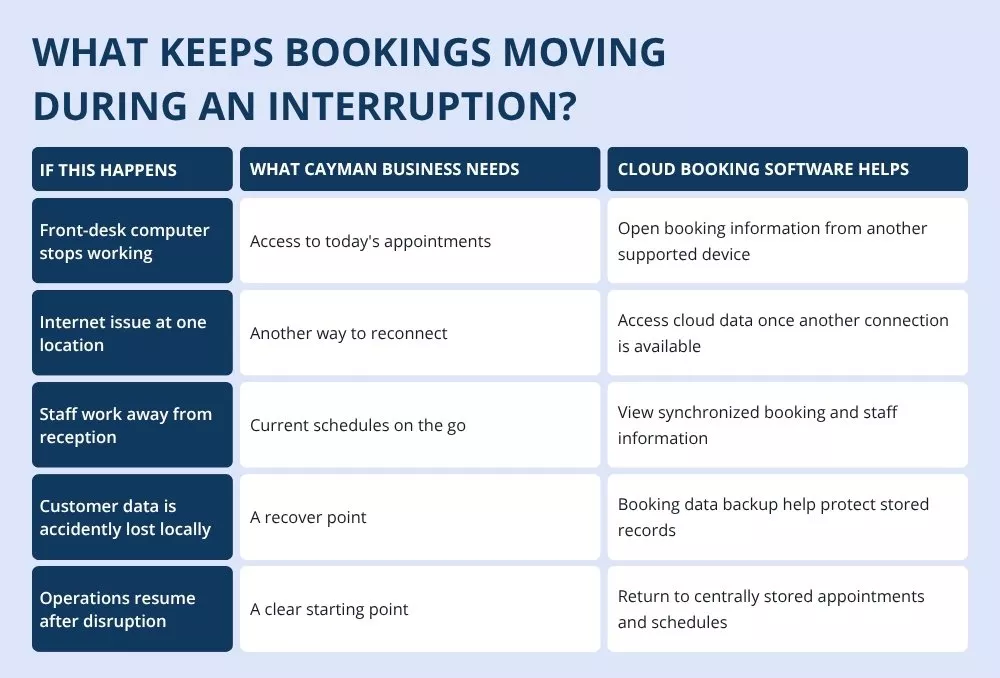
Suppose the reception computer is unavailable, but another approved device can connect to the service. The team may still be able to access relevant cloud-based information from that device. That is one of the practical benefits of cloud scheduling software. The schedule is no longer useful only from the desk where it was originally managed.
For Cayman businesses where managers and employees may move between locations or work away from reception, that flexibility can support day-to-day operations as well as unexpected interruptions.
Booking Data Backup Matters Before Something Goes Wrong
Backing up information sounds like an IT task. For an appointment-based business, it is also a customer service issue. Imagine having tomorrow's appointments confirmed and then losing the records needed to understand who is coming. The problem is no longer simply “we lost some data.”
It becomes:
- Who booked it?
- What service did they choose?
- When are they arriving?
- Which employee is expecting them?
This is why booking data backup deserves attention when choosing booking technology. Cloud Booking Software states that its service includes automated backups and software updates, with backups intended to protect data against unexpected events such as hardware failures or natural disasters.
Cloud Appointment Software Can Help When You Need Another Device
The front desk computer is not business. Neither is a manager's laptop.
Your booking information should not become inaccessible simply because one piece of hardware has a problem. Cloud appointment software can allow authorized teams to access relevant cloud-based information through another compatible, internet-connected device.
- Reception Computer Down?
- Move to another approved device.
- Manager Away from the Business?
Cloud access can make relevant information available remotely, subject to permissions and connectivity.
Team Working from Another Location? A centralized cloud system can help users work from the same current information rather than passing different file versions between devices. Automatic synchronization is a way of keeping users on the latest version of stored information.
That can reduce another common problem for two employees working from two different versions of the same information.
Cloud Scheduling Software Can Support Temporary Operational Changes
Not every interruption is a technical failure.
A business may temporarily close a location. Staff may need to work differently for a period of time. A manager may need access while away from the office.
The appointments still need attention.
This is where cloud scheduling software can help keep schedule information accessible to authorized users rather than tying it to one physical workplace.
Location Changes, Schedule Does Not Have to Disappear.
Imagine a Cayman service business temporarily cannot use its usual front desk. The team may need to understand upcoming bookings before deciding what happens next.
With cloud booking software, relevant booking and scheduling information can remain centrally accessible through supported connected devices.
The software cannot prevent a local outage or physical closure. What it can do is reduce dependence on the unavailable device or location. That distinction matters.
Internet Down? Cloud Storage Does Not Mean Magic
There is one-point businesses should understand clearly. Cloud booking software still requires connectivity to access cloud-hosted information. If the location's internet connection is completely unavailable, a cloud service cannot make that connection magically reappear.
What cloud access can help with is flexibility.
One Connection Fails, Another May Still Be Available
Depending on the circumstances and the business's approved setup, employees may be able to access cloud appointment software through another internet connection or supported device.
The advantage is that the booking data itself is not stored only on the computer experiencing the local problem. Once connectivity is available, cloud-hosted information can become accessible again.
This is also why booking data backup and cloud access solve different parts of the continuity problem. Cloud access helps authorized users reach information from supported connected devices. Backup helps protect stored information against data loss. A business should think about both.
Restoring Service Should Start with Knowing What Was Scheduled
Suppose an interruption lasts for two hours.
When normal operations return, the business needs to recover quickly.
Employees need to know which appointments were affected, what is coming next, and what customer information is available.
Cloud scheduling software can give the team a central schedule to return to rather than reconstructing the day from memory, paper notes, calls, or separate messages.
From Interruption Back to Appointments
A clearer recovery journey can look like:
- System or Location Interrupted
- Access Cloud-Based Information from an Available Connection
- Review Appointments and Staff Schedules
- Identify Affected Customers
- Resume or Adjust Booking Activity
That is a much better starting point than asking every employee:
“Do you remember who was booked this afternoon?”
Booking Data Backup Is Also About Customer Trust
Customers do not necessarily care where booking data is stored. They care about what happens when they arrive. If a customer has already booked an appointment, they expect the business to know about it.
That is why booking data backup connects directly with customer experience.
A service business should be able to protect the information needed to understand existing bookings even when something unexpected affects its normal setup.
Cloud storage includes encryption, multi-factor authentication, and regular backups as part of its security approach. For businesses evaluating cloud systems, security should sit alongside accessibility and recovery.
Cloud Appointment Software Should Keep Growing with the Business
Cloud systems are not only useful during internet interruptions. They can also make sense as a Cayman business grows.
- More customers mean more booking information.
- More employees mean more schedules.
- More services mean more appointment data.
Potentially, more locations mean more people who need controlled access to the same information.
Cloud appointment software can support that growth without requiring every employee to depend on the same physical machine.
Scalable storage that can expand with changing business data requirements without requiring additional local hardware. That makes cloud storage part of everyday business planning, not simply an emergency measure.
What Should You Ask Before Choosing Cloud Booking Software?
Not every cloud service should be judged only by how many features appear on its website. Before choosing cloud booking software, ask practical questions about what happens when your normal working setup changes.
- Can We Access Information from Another Device? Your team should understand what devices and access methods are supported.
- How Is Booking Data Protected? Ask about security measures, user permissions, authentication, and booking data backup.
- Are Backups Automatic? Manual backups can easily become another task someone forgets.
- Does Information Stay Synchronized? A good cloud scheduling software setup should reduce the chance of employees working from outdated information.
- What Happens When Connectivity Returns? Understand how your business resumes access and whether any actions taken during an interruption need reconciliation.
- Can Access Be Controlled by User? Not every employee needs access to every piece of customer or business information.
These questions tell you much more than simply asking, “Is it in the cloud?”
Keep Your Cayman Booking Data Within Reach
A computer can fail. Internet access at a location can be interrupted. Teams may sometimes need to work away from their normal desk. Those events should not make your booking information dependent on a single piece of hardware.
Cloud booking software gives Cayman service businesses a more flexible way to keep important information centrally stored and accessible from supported internet-connected devices.
With cloud appointment software, teams can access relevant information away from the original desk. Cloud scheduling software can help keep schedules centrally available and synchronized. And booking data backup can help protect the records businesses depend on when unexpected problems occur.
Dotbooker supports anytime access from internet-connected devices, automatic synchronization, security measures, and automated backups. Its Mobile Application feature also provides access to bookings, schedules, and management tools on the go.