- By Dotbooker
- Aug 12, 2026
- 344
Booking Automation Software: Admin Work You Can Stop Doing
Running a service business sounds exciting from the outside.
You meet clients, deliver great service, build relationships, and watch people come back because they trust your work. But behind the scenes, there is another side that many owners and staff know too well.
The Admin Work
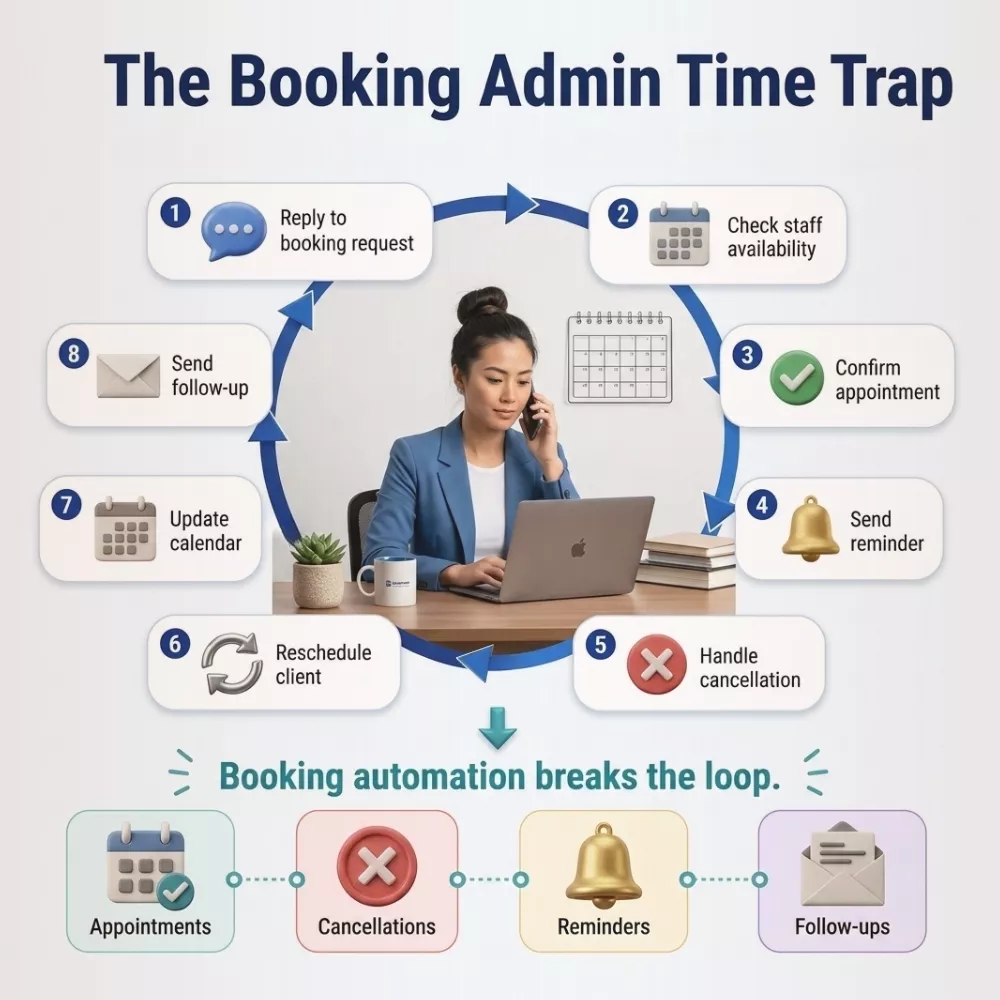
Replying to booking requests. Confirming appointments. Moving time slots. Calling customers who forgot to show up. Updating calendars. Answering the same questions again. Checking who cancelled. Sending reminders. Asking staff if they are available. Fixing double bookings. Updating spreadsheets. Following up after appointments.
It looks like small work, but it quietly eats the day.
This is where booking automation software becomes useful. It helps service businesses manage appointments, cancellations, reminders, rescheduling, staff availability, and follow-ups in one system, so owners and teams can spend more time serving clients and less time chasing admin tasks.
For salons, spas, clinics, fitness studios, training centers, repair services, consultants, and wellness businesses, booking automation software is not just about saving time. It is about creating a smoother experience for both the business and the client.
What Admin Work Is Really Taking Your Time?
Admin work does not always feel like a big problem at first.
- One client asks, “Are you available tomorrow?”
- Another wants to reschedule the appointment.
- Someone cancels at the last minute.
- A staff member needs a shift update.
- A customer forgets their appointment.
- Another asks for the address, price, or service duration.
Each task may take only a few minutes. But by the end of the day, those minutes become hours.
Without booking automation, staff often need to check the calendar manually, confirm available slots, send messages, update records, and remind clients one by one. That is a lot of repeated work for something that can be handled faster with the right system.
This is why many businesses start looking for an online booking and scheduling system. So that their front desk, owner, or team members spend more time managing bookings than improving customer experience.
Who Feels the Pressure of Manual Booking?
The owner feels it because they cannot focus on business growth.
The receptionist feels it because they are answering calls while clients are standing in front of them.
The staff feels it because schedules change without clear updates.
The customer feels it because they have to wait for a reply, call again, or wonder if their booking is confirmed.
Adapting appointment automation becomes more than a digital feature. It becomes a better way to manage daily service flow, and it resolves your issue of manual booking system that are hurting your revenue.
With booking automation software, the business can let customers book available slots, receive confirmations, get reminders, cancel or reschedule based on rules, and receive follow-ups without the team handling every step manually.
That means fewer interruptions, fewer mistakes, and more time for the client who is already in front of you.
When Manual Booking Starts Hurting Client Satisfaction
Clients may not always say it, but they notice booking problems.
- They notice when replies are slow.
- They notice when no confirmation is sent.
- They notice when reminders are missing.
- They notice when staff cannot find their booking.
- They notice when they have to repeat the same information.
A smooth booking experience creates trust before the service begins.
If customers can book easily, receive clear updates, and know what to expect, they arrive with more confidence. If the process feels messy, they may start doubting the business.
This is why booking automation software supports customer satisfaction. It helps make the first step of the client journey feel organized.
And when the booking journey feels organized, the service feels more professional.
Employee Questions That Show Admin Work Is Getting Too Much
Sometimes employees ask questions that reveal the real problem. These questions are signs that the business needs better systems.
- “Do I have to call every client again, or will reminders go automatically?”
- “Which booking is final? The calendar, the WhatsApp message, or the notebook?”
- “Why are we still manually updating cancellations when the system could do it?”
- “Can clients reschedule themselves instead of calling us every time?”
- “How do we know if a customer received the confirmation?”
These are not lazy questions. They are practical questions. Employees want to serve clients better, but repeated admin's work makes that harder. Booking automation helps answer these questions by creating a clearer process.
What an Automated Booking System Can Handle for You
An automated booking system can handle many routine tasks that usually take up staff time.
It can confirm bookings automatically. It can remind clients before the appointment. It can reduce missed appointments by sending timely alerts. It can allow rescheduling when rules permit. It can block unavailable time slots. It can help prevent double bookings. It can keep booking history in one place.
For example, a spa owner does not need to manually message every client before their session. A fitness studio does not need to call every member before class. A clinic does not need to manually update every cancelled appointment. A salon does not need to rely on memory to know who is coming next.
With appointment automation, these steps become part of the system.
That does not mean service becomes less personal. It means staff have more time to be personal where it matters, during the actual client experience.
How Booking Automation Software Changes the Daily Flow
Think about a normal appointment journey.
A client wants to book. They check availability. They choose a service. They receive confirmation. They get a reminder. They arrive on time. After the appointment, they may receive a follow-up message or rebooking prompt.
Now imagine doing all of that manually for every client.
That is where booking automation software makes the process easier. A good system can support:
- Online appointment booking
- Automatic confirmations
- Reminder messages
- Cancellation rules
- Rescheduling options
- Staff availability
- Service duration
- Follow-up messages
- Calendar updates
- Booking records
Instead of the team asking, “Did we confirm this client?” the system keeps the process moving.
This kind of booking automation helps reduce back-and-forth communication. It also gives customers more control because they can choose from available time slots instead of waiting for someone to reply.
How Appointment Automation Helps Staff Focus on Clients
Good staff members should not spend their best energy checking calendars all day.
They should be welcoming clients, preparing services, solving real issues, and creating a better experience.
Appointment automation helps by reducing repeated tasks that do not need manual attention every time. It allows the team to focus on the work that needs human care.
For example, a massage therapist should not need to worry about whether the next appointment was confirmed. A trainer should not need to manually remind every class of a participant. A receptionist should not spend the whole morning rescheduling appointments when clients can do it through a guided process.
With booking automation software, the team gets more breathing room.
What Happens When Appointment, Cancelation, Scheduling Is Under One System?
The real strength of an automated booking system is not just automation. It is a connection.
Appointments, cancellations, rescheduling, staff availability, reminders, and follow-ups all work better when they are managed in one place.
If everything is separate, problems start.
- The calendar says one thing.
- The client message says another.
- The staff member remembers something else.
- The owner checks a spreadsheet that is already outdated.
With booking automation software, the business gets one cleaner view of appointment activity. This makes daily decisions easier and reduces confusion. And have a better online payment flow giving customers a smooth checkout.
What Booking Automation Means for Owners
For business owners, time is one of the most valuable resources.
If the owner is constantly managing bookings, replying to messages, correcting schedules, and checking cancellations, they have less time to improve services, train staff, review reports, or grow the business.
That is why booking automation software is not just a front-desk tool. It is a business control tool.
It helps owners see appointment flow more clearly. It reduces repeated admin work. It gives staff a better system. It gives customers a smoother experience.
Most importantly, it creates space to focus on client satisfaction.
Why Booking Automation Is Not About Replacing People
Some business owners worry that automation may make the service feel cold. But good booking automation does not replace human service. It protects it.
When staff are not buried in repeated admin tasks, they can give more attention to clients. They can prepare better. They can respond to real concerns. They can make the experience feel more personal.
An automated booking system handles the routine steps. Your team handles the relationship.
That is the balance of service businesses need. No-shows and last-minute cancellations are frustrating because they waste time and affect revenue.
Sometimes clients forget. Sometimes they lose confirmation. Sometimes they meant to reschedule but did not know how. Sometimes they were never reminded.
Appointment automation can help reduce these problems by sending timely reminders and giving clients a clearer way to confirm, cancel, or reschedule.
An automated booking system cannot remove every cancellation, but it can reduce avoidable confusion. It can help the business know who is coming, who cancelled, and which time slots are open again.
This gives staff a better chance to fill empty slots and manage the day properly.
Stop Letting Admin Work Run the Day
Booking should bring clients in, not bury your team in repeated tasks.
Dotbooker helps service businesses manage bookings, cancellations, reminders, rescheduling, payments, staff availability, and customer records from one connected platform. Instead of chasing appointments manually, your team can focus on the people already in front of them.
With Dotbooker, every booking becomes easier to manage, every client gets a smoother experience, and every team gets more time back in the day.
If your business is ready to spend less time on admin and more time creating great customer experiences, Dotbooker is built to help you get there.
Popular Blogs

- Oct 20, 2022
- 6127
- Sep 08, 2024
- 5616

- Nov 11, 2022
- 4994

- Oct 13, 2025
- 4045
Ready to Transform
Your Business?

Get expert guidance to streamline your business operations.