
- By Dotbooker
- Aug 21, 2026
- 288
Multi-Location Scheduling Software for Caribbean Brands
Opening a second location is an exciting stage for a service business.
Opening a third or fourth is where scheduling appointments can start becoming complicated.
A salon that once managed one calendar may suddenly have stylists working between two branches. A fitness brand may offer classes at several studios. A wellness company may need therapists to work at different locations depending on demand.
Inventory may be available at one branch but running low at another. Customers do not see this complexity. They simply expect to choose a location, find an available service, select a convenient time, and book. For growing Caribbean service brands, Multi-Location Scheduling Software can bring these moving pieces together.
Instead of operating every branch like a separate business, scheduling information, staff availability, appointments, and location-specific activity can be managed through a connected system. The goal is not simply to have more locations. It is to make every location feel like part of the same business.
What Is Multi-Location Scheduling Software?
Multi-Location Scheduling Software helps service businesses manage appointments, staff, services, schedules, and location-specific information across multiple branches.
Rather than maintaining an independent calendar for every location, businesses can create a connected scheduling structure while still controlling what happens at each branch.
For example, imagine a salon brand operating in George Town and another location elsewhere in Grand Cayman.
A customer wants a haircut on Saturday morning. They care more about getting their preferred stylist than which branch they visit.
With multi-location booking software, the customer could select a location or find suitable availability based on the services and staff offered there.
Behind the scenes, the business needs to know where that stylist is working, which appointment times are open, and whether the service can be delivered at that branch. That becomes increasingly difficult to coordinate manually as the salon business grows.
Growth Should Add Locations, Not Scheduling Confusion
A single-location business usually has a relatively simple scheduling structure.
- One team.
- One location.
- One calendar.
- One inventory pool.
Add more branches and the number of possible scheduling conflicts increase.
A staff member may work at Location A on Monday and Location B on Tuesday. Another employee may occasionally cover appointments at both. A popular treatment may be available at one location but not another. Customers may accidentally contact the wrong branch.
A branch scheduling system helps separate location-specific operations while keeping management connected.
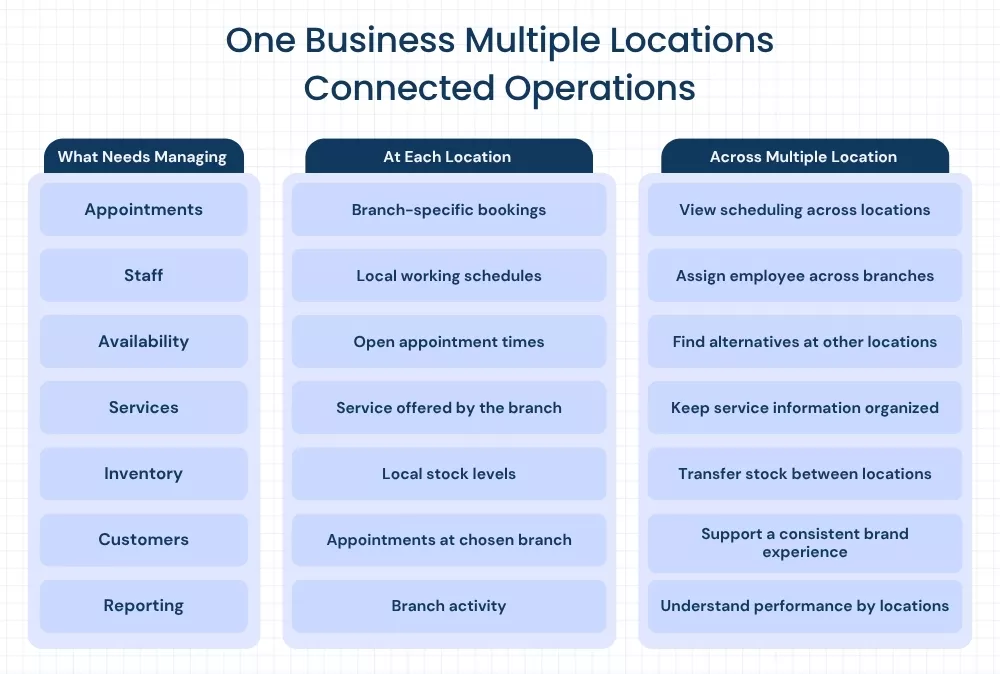
Each branch can maintain its relevant: - Working hours - Staff availability - Services - Appointments - Resources - Inventory - Customer bookings
Management can still see what is happening across the business rather than collecting information from each location separately.
Automatically Sync Scheduling Data Across Locations
A customer calls your first location and asks whether their preferred stylist is available tomorrow. The stylist is actually working at your second branch. If calendars are managed separately, the first team may need to call the second location, check out a group chat, ask the stylist, or tell the customer to contact another branch. That is unnecessary friction.
Multi-Location Scheduling Software can help keep scheduling information connected across locations, so employees and customers can work with current availability rather than disconnected calendars.
When an appointment is booked, the schedule should reflect that booking wherever the relevant availability is being managed. This becomes especially useful for Caribbean brands expanding beyond a single island or territory. Businesses operating across different time zones need appointments to display according to the correct local schedule.
A connected multi-location appointment software setup can help prevent confusion around appointment times while keeping location-specific schedules organized.
One Update Should Not Require Five Updates
Growth becomes difficult when every small change needs to be repeated. Suppose a fitness instructor becomes unavailable next Friday. With separate schedules, someone may need to check:
- Location 1 calendar.
- Location 2 calendar.
- Class schedules.
- Customer appointments.
- Internal staff communication.
With connected scheduling, availability changes can be reflected wherever that employee is assigned. The business spends less time coordinating calendars and more time serving customers.
Let Staff Work Across Multiple Locations
Your employees do not always belong to one branch. A massage therapist may work at one spa three days a week and another branch for two. A senior stylist might rotate between locations based on customer demand.
A personal trainer may run morning sessions at one gym and evening sessions elsewhere. Forcing each employee into a single-location schedule can limit how a growing service business operates. A branch scheduling system should help businesses define where employees are available and when. For example:
- Employee: Maya
- Monday: George Town
- Tuesday:George Town
- Wednesday: Location B
- Thursday: Location B
- Friday: George Town
Customers booking Maya should only see times that match the location where she is actually working. This helps the business use staff across branches without turning scheduling into a daily coordination exercise.
Multi-Location Booking Software Can Make the Customer Journey Simpler
Multi-location operations should not create a multi-step headache for customers. A customer should not have to visit separate websites for every branch or contact several locations to find an appointment. Multi-location booking software can create a clearer journey:
Choose service → Select location → Find staff or availability → Pick time → Book Or, if location is flexible:
Choose service → Select preferred time → View available locations → Book
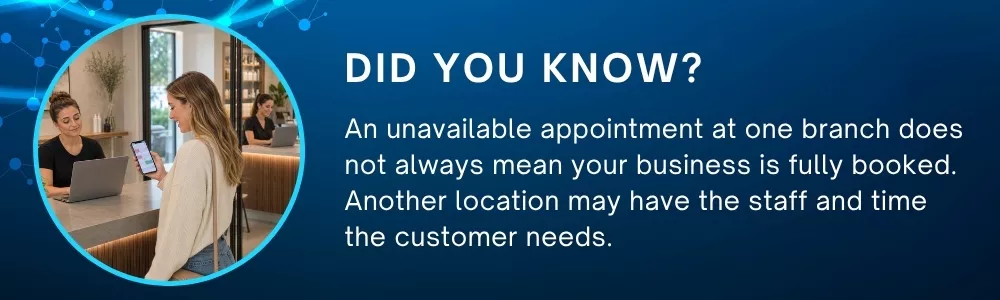
That second journey can be particularly useful for customers who care more about getting an appointment quickly than visiting a particular branch. If the 4 PM appointment at one location is full, but another branch has availability, the customer has another opportunity to book with your brand rather than searching for another provider.
Inventory Should Move with the Business Too
Scheduling is only part of multi-location management. Consider a beauty or wellness brand with two locations. Location A has plenty of popular retail products. Location B is nearly out.
If each branch operates with isolated inventory information, the second location may reorder stock while the first has more than it currently needs.
For businesses where inventory can be transferred between branches, real-time visibility can help teams understand what is available across locations before making purchasing decisions. A connected system can support an inventory transfer workflow such as:
Location B needs stock → Check availability at Location A → Transfer quantity → Update both location inventories.
This can be useful for products, consumables, or other items managed across branches. For a growing Cayman service brand, better visibility can reduce situations where one location has excess stock while another struggles to meet demand.
Consistency Matters When Customers Visit Different Locations
A customer who knows your brand may expect the same quality wherever they visit. They should not feel like they are dealing with a completely different company every time they choose another branch.
Consider someone who normally visits your George Town salon but needs an appointment at another location this week. They should not need to start the entire relationship again.
A connected multi-location booking software approach can help businesses provide a more consistent journey across branches, while each location still maintains its own schedules and availability.
For Caribbean brands planning regional growth, this becomes even more important. Your locations may be physically separate. Your customer experience should still feel connected.
Branch Scheduling System Can Give Managers Better Visibility
Opening more locations creates another challenge: knowing what is actually happening at each one.
- Which location receives the most bookings?
- Where are the busiest appointment periods?
- Which staff members work across multiple branches?
- Where is unused availability?
- Which services are being booked at each location?
A branch scheduling system can make location-level information easier to organize so managers can review individual branches without losing sight of the overall business. This matters because growth should not reduce visibility.
If management needs five spreadsheets and several phone calls to understand yesterday's activity, the business has grown faster than its processes.
Multi-Location Appointment Software Helps Prevent Double Booking
Flexible staffing creates opportunities, but it can also create risk, suppose a therapist is available at two locations. Location A books them from 2 PM to 3 PM. If Location B is working from an independent calendar, it might still show that employee is available at 2:30 PM. Now two customers have appointments with the same person.
A connected multi-location appointment software setup should account for employee availability across assigned locations, so one booking can prevent conflicting availability elsewhere. This is one of the practical reasons why disconnected calendars become harder to manage as a business expands.
Caribbean Growth Makes Connected Scheduling More Important
A service brand may begin with one Cayman location and gradually expand.
- The second branch opens.
- More employees join.
- Services increase.
- Customers start moving between locations.
Eventually, the processes that worked for one location became difficult to maintain. This is where Multi-Location Scheduling Software becomes less about convenience and more about managing growth without creating unnecessary administrative work.
A growing business needs enough flexibility for each branch to operate according to local demand, while management still needs a clear view across locations. That balance becomes harder to achieve through disconnected calendars, spreadsheets, and manual updates.
Make Every Location Feel Like the Same Brand
Customers do not care how many calendars your team manages behind the scenes. They care that booking works. They care that the employee they selected is actually available. They care that the service is offered at the chosen location. They care that their appointment information is correct.
They care that visiting another branch still feels like dealing with the same business. A multi-location appointment software approach helps businesses keep these experiences connected as they grow.
Grow Across Locations with Booking Software System
Expanding your service business should create more opportunities, not more scheduling confusion. Dotbooker helps service businesses manage appointments, staff, availability, customers, and business operations through one connected platform.
For growing Cayman and Caribbean brands, Dotbooker can help keep location schedules organized, make staff available across branches where appropriate, support location-specific booking, and provide clearer visibility as the business expands.
Combined with multi-location booking software, businesses can give customers a simpler way to choose services, locations, employees, and appointment times without navigating separate booking processes. Growth may take your brand to new locations.
Your schedule should be ready to go with it.
Popular Blogs

- Oct 20, 2022
- 6181
- Sep 08, 2024
- 5665

- Nov 11, 2022
- 5041
- Oct 13, 2025
- 4094
Ready to Transform
Your Business?

Get expert guidance to streamline your business operations.