- By Dotbooker
- Oct 09, 2026
- 18
Dance Studio Software for Parents, Students and Classes
At 4:00 PM, Mia is ready for ballet.
She knows her teacher, remembers the routine, and is excited about the upcoming performance.
Her mother, meanwhile, is doing something very different.
She is checking whether the class time has changed, confirming next week’s session, looking for the payment deadline, and trying to remember whether Mia’s younger brother has dance class on Tuesday or Thursday.
The student dances and parents manage everything around it. This small difference makes running a dance studio more complicated than many appointment-based businesses.
For Cayman dance schools, the person attending the class may be a child, while a parent or guardian handles registration, schedules, payments, reminders, workshops, and communication.
When those details are scattered across spreadsheets, messages, paper registers, and calendars, even a small studio can become difficult to manage.
This is where dance studio software can help connect with the people who teach, the students who attend, and the parents who manage everything around the class.
Why Is Managing a Dance Studio Different?
Normal booking appointments often involve one person's books, attend, and pay. Dance classes can involve several people on a single journey.
- The student attends the class.
- The parent may register and pay.
- The instructor teaches and tracks attendance.
The studio manages the class schedule, communication, workshops, performances, and payments.
Now imagine doing this for 100 students.
One parent may have two children. Those children may attend different dance styles, levels, and days. One might join a workshop while the other is preparing for a performance. Good dance school software should help the studio keep these moving parts organized without making parents chase information every week.
One Parent, Two Children, Four Different Classes
Consider a Cayman family with two children enrolled at the same dance studio.
Ava
Ballet
Monday and Wednesday
Performance rehearsal on Saturday
Noah
Hip-Hop
Tuesday
Special workshop next month
The parent needs to understand both schedules. The studio needs to keep each student's classes and participation clear. Managing this through separate WhatsApp conversations and spreadsheets becomes harder as enrolment grows.
Dance class management software gives studios a clearer way to organize student records, class activity, attendance, and schedules.
The objective is simple: when a parent asks, “What does my child have this week?”, finding the answer should not require searching through several places or sheets or notebooks.
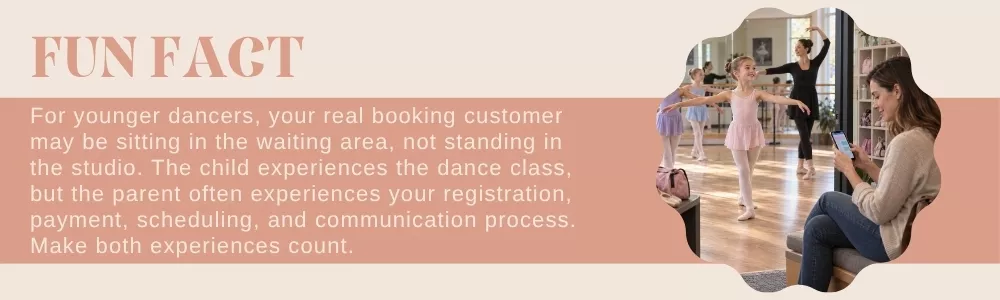
Dance Studio Booking System: Make Registration Easier
Registration is one of the first experiences a family has with your studio. If joining a class requires several messages, forms, payment conversations, and calls, parents may feel the administrative workload before the first lesson even begins.
A dance studio booking system can give families a clearer route to available classes and workshops.
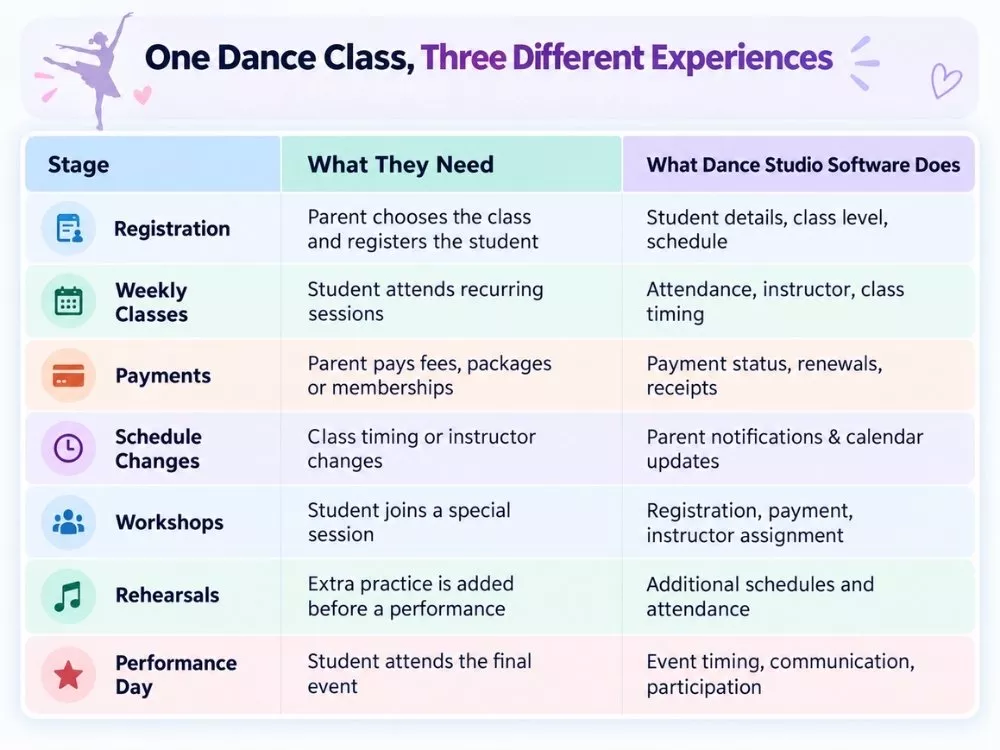
For example: Choose Class → Select Available Session → Register → Pay → Receive Update
The software supports online class booking, instructor selection, workshop registration, payments, and schedule management for dance academies. That means the front desk can spend less time manually processing straightforward registrations and more time helping families who actually need assistance.
Dance Class Scheduling Software Keeps the Week Easier to Follow
Dance studios rarely run one type of session. A weekly calendar might include:
- Beginner ballet
- Intermediate ballet
- Hip-hop
- Contemporary dance
- Private lessons
- Rehearsals
- Workshops
- Performance preparation
Now add different instructors, age groups, levels, and rooms. A basic calendar can quickly become crowded.
Dance class scheduling software can help organize recurring classes, instructor availability, workshops, rehearsals, and performance dates in one clearer schedule.
Booking Calendar supports class schedules, instructor availability, workshop sessions, performance dates, and rehearsal slots. That gives studio staff a better view of what is happening while making schedule changes easier to manage.
Recurring Classes Should Not Create Recurring Admin Work
Most dance students do not attend once. They return every week. That means the studio is managing recurring activity, not isolated appointments.
If ballet runs every Monday at 5:00 PM, staff should not have to rebuild the same class of administration every week. A useful dance studio software setup should help staff manage regular classes while keeping attendance, student information, and schedule changes organized.
This becomes particularly helpful when the normal routine changes.
Maybe Monday's instructor is unavailable.
Perhaps rehearsal is moved to Saturday.
A public holiday changes the class date.
- Parents need to know.
- Students need to know.
- Instructors need to know.
- The studio needs a reliable schedule.
When a Class Changes, Parents Need to Know Quickly
Few things create confusion faster than a schedule change that reaches only half the class. Imagine moving a 5:00 PM lesson to 5:30 PM.
- The instructor knows.
- Reception knows.
- Six parents know.
- Four do not.
Now the studio is answering calls while students arrive at different times. Communication should be closely connected with class activity. Dance school software can help studios manage notifications around schedule changes, upcoming performances, payment deadlines, renewals, and other announcements.
Notifications for class changes, performances, payment deadlines, renewals, and academy updates.
For parents, this means fewer surprises. And for the studio, it means less repetitive messaging.
Payments Are Part of the Parent Experience Too
A parent may need to pay for more than regular classes.
There might be:
- Class fees
- Memberships
- Workshops
- Recital tickets
- Dancewear
- Special training
When payment records sit separately from student information, administration becomes harder. Dance class management software can help keep class-related information and payments easier to review.
ePOS supports transactions for class fees, dancewear, recital tickets, workshops, and memberships. For the parent, the process becomes clearer.
For staff, there is less need to ask: “Has this workshop already been paid for?”
Workshops and Performances Change the Normal Routine
Regular classes may follow a predictable weekly rhythm. Then performance season arrives. Suddenly, the studio has:
- Extra rehearsals.
- Costume arrangements.
- Special workshops.
- Performance dates.
- Additional training sessions.
- Different instructor requirements.
A dance studio booking system should support more than weekly class registration. The software allows students to register for workshops and supports calendars for rehearsals, events, class schedules, and performance dates. This gives studios a clearer way to manage the periods when the normal weekly schedule becomes much busier.
What Should Dance Studio Software Include?
Before choosing software for your Cayman dance academy, look beyond basic online booking.
Online Class Registration
A dance studio booking system should make it easier for students or families to register for eligible classes and workshops.
Class and Student Management
Dance class management software should help staff organize student information, attendance, class levels, and recurring sessions.
Calendar Management
Your dance class scheduling software should give staff visibility into classes, instructor availability, rehearsals, workshops, and performances.
Instructor Management
The studio should be able to manage instructor availability, profiles, and class assignments.
Notifications
Parents and students need timely updates about class changes, performances, payments, and renewals.
Payments and ePOS
The business may need to manage class fees, memberships, workshops, recital tickets, or other studio purchases.
Memberships
Membership options can help studios organize access to classes, workshops, events, or training programs.
These capabilities matter because a dance school is not simply selling appointments. It is managing ongoing relationships between families, students, instructors, and classes.
Let Parents Manage Less and Students Dance More
Parents should not need three WhatsApp conversations, a paper timetable, and a payment screenshot just to keep up with their child's dance classes.
And your staff should not spend the day matching those messages back to spreadsheets.
Dotbooker gives Cayman dance academies online class booking, student management, instructor scheduling, recurring class support, attendance tracking, workshop registration, calendars, notifications, memberships, payments, ePOS, and reporting tools from one connected platform.
With dance studio software, studios can keep everyday administration clearer. Dance school software helps manage the wider academy, while dance class management software keeps students and classes easier to follow.
A dance studio booking system makes registration simpler, and dance class scheduling software helps keep instructors, classes, workshops, and rehearsals on track.
The goal is not to put technology at the center of your dance studio.
Popular Blogs

- Oct 20, 2022
- 6204

- Sep 08, 2024
- 5692

- Nov 11, 2022
- 5063

- Oct 13, 2025
- 4126
Ready to Transform
Your Business?

Get expert guidance to streamline your business operations.