Booking Software for Caribbean Tour Operators: More Seats

A traveler has one free afternoon left before flying home. They want to do something memorable.
- A reef tour.
- A sunset cruise.
- A food experience.
- A guided island trip.
- Maybe a last-minute watersports activity.
They open their phones and start searching.
One tour company has beautiful photos and great reviews, but there is no way to check availability. The travelers send a message and wait.
Another operator clearly shows available departures and provides a simple way to reserve a place.
The travelers' books the tour with them.
For the first operator, the problem was not the quality of the experience. There may have been several seats available. The problem was that the customer could not move from interest to confirmation quickly enough.
Across the Caribbean, tour and activity businesses work with capacity that expires. A seat on today's boat trip, a space on this afternoon's food tour, or an unused jet ski rental period cannot be stored and sold next week.
Booking software for tour operators helps businesses make available capacity easier to find, reserve, and manage while the team focuses on delivering the experience.
An Empty Seat Is More Than Unused Space
Consider a 20-seat catamaran tour. 17 seats are booked and 3 seats remain available. The operator has already paid for the crew, fuel, preparation, equipment, and other operating costs associated with the departure.
If those final seats remain empty, the trip still operates, but the operator misses an opportunity to earn more revenue from capacity that was already available.
The same problem applies to:
- Snorkeling excursions
- Scuba diving trips
- Fishing charters
- Food tours
- Cultural experiences
- Kayak rentals
- Guided hikes
- Horseback riding experiences
- Island sightseeing tours
- Sunset cruises
- Watersports activities
Once the departure time passes, those seats cannot be sold again. Booking software for tour operators helps businesses make remaining availability easier to manage and easier for travelers to book.
Travelers Do Not Always Book During Office Hours
A visitor may spend the morning at the beach, have dinner in the evening, and start planning tomorrow's activities from a hotel room at 10 PM.
Other travelers may be researching excursions several weeks before arriving in the Caribbean.
Someone else may decide to book an activity after seeing photos posted by friends that afternoon.
Travel planning does not follow the opening hours of a booking desk. If customers must wait for someone to answer a phone call or respond to a message before knowing whether space is available, they may continue searching.
Activity booking software allows operators to keep their booking opportunity open when the physical office is closed, or the team is busy delivering an experience.
Travelers can view available options and make a booking when their interest is highest.
That creates a more convenient experience for the customer and gives the operator another way to capture demand.
Booking Software for Tour Operators Creates One Clear View of Availability
The real value of booking software for tour operators becomes clear when reservations start arriving in different directions.
Imagine an operator receives:
- Four bookings through the website
- Six reservations from a hotel concierge
- Three walk-in customers
- Two bookings through social media messages
A family is asking to move tomorrow's reservation to Friday. Without one central reservation process, the team must manually update availability every time something changes. One missed update can create an overbooking.
One forgotten cancellation can leave capacity unavailable to other customers. A tour reservation system gives the team a clearer view of confirmed bookings, cancellations, and remaining capacity.
Instead of asking, "How many seats do we think are left?" The team can check the current schedule.

Why does Real-Time Availability Matters During Busy Seasons for Tour Reservations Systems?
Caribbean tourism demand is not evenly distributed throughout the year.
Operators may experience sharp increases in bookings during winter travel periods, public holidays, cruise arrivals, festivals, school breaks, and major events.
During high-demand periods, staff may spend much of the day answering the same questions:
- "Do you have space tomorrow?"
- "Can you take a group of eight?"
- "What time is the next departure?"
- "Is the afternoon tour full?"
- "Can we move our booking?"
A tour reservation system helps reduce this repetitive communication by keeping availability organized. Customers can see suitable booking options while staff maintain a clearer view of upcoming departures.
For businesses managing several activities, Calendar Booking System can help organize schedules and bookings through a central calendar.
One Booking Can Affect More Than One Resource
Tour reservations can be more complicated than standard appointments. A single booking may require:
- A guide
- A boat or vehicle
- Safety equipment
- Rental gear
- A specific departure location
- A limited number of seats
- Preparation time between departures
This is why operators need more than a basic online form.
Activity booking software should help the business understand whether the required capacity and schedule are available before accepting another reservation.
For example, a watersports operator may offer jet ski rentals, snorkeling tours, paddleboard rentals, and private boat trips.
Each experience has different durations and capacity limits. A clear booking process helps the operator avoid accepting reservations that cannot be delivered properly.
When Weather Changes, Tour Schedules Need to Change Quickly
Caribbean tour operators know that a confirmed schedule can change quickly. Heavy rain, rough sea conditions, equipment problems, transportation delays, or other unexpected situations may affect whether an activity can operate as planned.
When one departure changes, the operator may need to manage several tasks at once.
- Which travelers are affected by?
- Who has already paid?
- Can customers move to another departure?
- How many seats are available on the next tour?
- Which customers need to receive updated instructions?
When reservations are managed through calls, messages, spreadsheets, and separate calendars, answering these questions can take valuable time.
A tour reservation system gives the team a central place to review affected bookings and understand which travelers need assistance.
For example, if a morning boat tour cannot operate because of sea conditions, staff can review the customer list, check availability on later departures, and manage reservation changes from a clearer starting point.
Some travelers may choose another time. Others may want to book a different activity. A few may request cancellation based on the operator's booking policy. Having organized reservation information helps the team respond more quickly without searching through different booking channels.
This is where automated booking software can help operators reduce repetitive administrative work and manage booking activity through a clearer process.
For Caribbean experience businesses, where weather and operating conditions can influence daily schedules, having access to current reservation information can make unexpected changes easier to manage.
Tour Booking Software Can Help Reduce Overbooking Problems
Overbooking is more than an administrative mistake. It can affect the customer's experience before the activity even begins.
Imagine telling a family that the excursion they booked is already full.
- The operator may need to offer another departure, issue a refund, or arrange an alternative activity.
- The customer may leave disappointed and share the experience online.
- Reliable tour booking software helps operators maintain a clearer view of capacity as reservations change.
- When a customer books a seat, remaining availability can be adjusted.
- When a reservation is cancelled, that space can become available again.
This helps staff manage capacity without repeatedly checking several calendars and booking records.
Activity Booking Software Can Make Payments Easier to Manage
Reservations and payments are closely connected.
Some tour operators require full payment at booking.
Others accept deposits.
Private tours may follow different payment rules from shared excursions.
Walk-in customers may pay at the counter.
The challenge begins when reservation records and payment information are maintained separately. Staff may need to confirm manually whether a booking has been paid, partially paid, or is still awaiting payment.
Activity booking software connected with payment options can help create a clearer booking journey. Multiple Payment Options supports businesses that need to offer customers different ways to complete payments.
The aim is to reduce unnecessary steps between selecting an activity and confirming a reservation.
Better Booking Records Can Support Better Business Decisions
Tour operators make many decisions based on demand.
- Should another afternoon departure be added?
- Which activity receives the most bookings?
- Are weekend tours filling faster than weekday departures?
- Is one location generating more customer demand?
- Are certain experiences regularly operating below capacity?
When booking information is spread across several systems, answering these questions becomes difficult.
Tour booking software keeps reservation activity more organized.
The booking reports in the software can help businesses review operational information and understand booking activity.
Better visibility can help operators make more informed decisions about schedules, capacity, staffing, and the experiences they offer.
When Does a Tour Operator Need Booking Software?
Some businesses wait until reservation management becomes chaotic before changing their process. There are usually warning signs much earlier. You may need booking software for tour operators if:
- Staff spend too much time answering availability questions
- Bookings arrive through several disconnected channels
- Capacity is difficult to confirm quickly
- Double-bookings or missed reservations are occurring
- Customers wait too long for confirmation
- Cancelled seats regularly remain unsold
- Payment status is difficult to track
- Staff cannot easily see tomorrow's departures
- The business is adding more activities or locations
Moving to a central system before these problems become severe can make growth easier to manage.
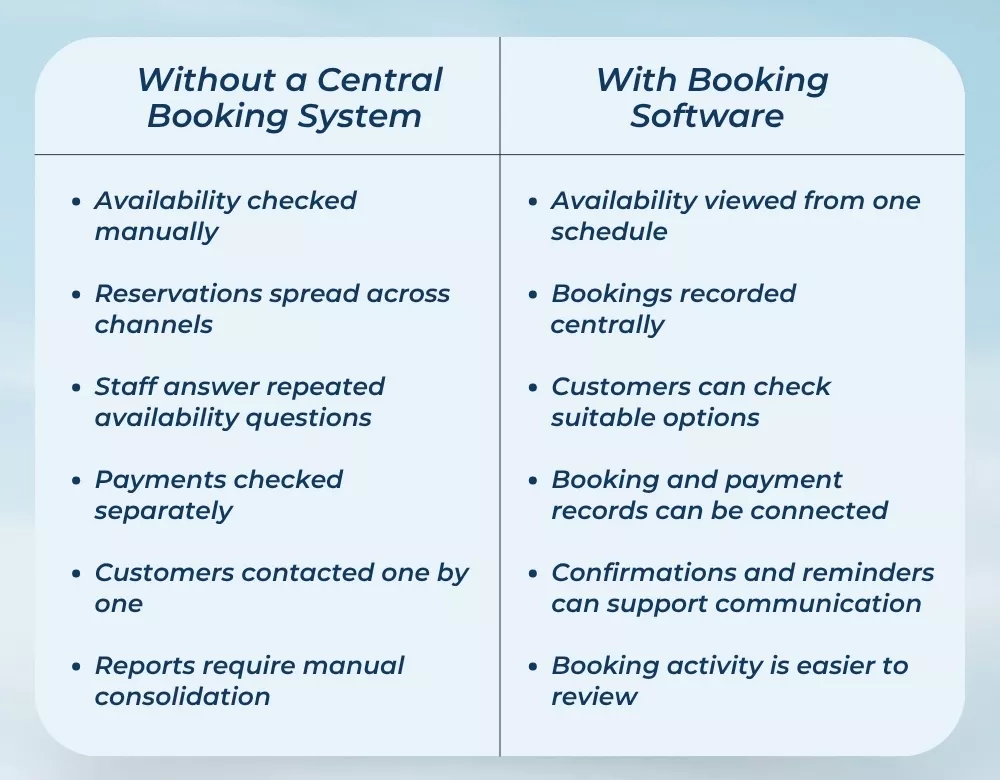
How Booking Software Changes Daily Tour Operations
The difference between disconnected reservation management and a central booking process can become clearer when the daily tasks are compared.
More Seats Sold Starts with Making Booking Easier
A great Caribbean experience can begin on a boat, underwater, on a hiking trail, inside a local restaurant, or along an island coastline.
For the traveler, it begins earlier.
It begins when they decide to book.
If checking availability is difficult, confirmation takes too long, or the booking process creates uncertainty; the operator may lose the customer before the experience starts.
Tour booking software helps bring reservations, schedules, capacity, and customer booking information into a clearer process. Activity booking software can help operators manage different experiences and customer demand.
A reliable tour reservation system can give teams better visibility into upcoming departures and remaining spaces. And booking software for tour operators can help Caribbean businesses keep selling while guides, crews, and staff focus on delivering memorable experiences.
Turn More Traveler Interest into Confirmed Bookings
Your next customer may be searching for an island experience while your team is on the water, guiding a group, preparing equipment, or helping another traveler.
They should not have to wait until someone returns to the booking desk to find out whether space is available.
Dotbooker helps service businesses manage online bookings, schedules, payments, notifications, waitlists, multiple locations, and business reporting from one connected platform.
Give travelers an easier path from discovering an experience to confirming their place. Make every available seat easier to find, book, and manage with Dotbooker.