Front Desk and Online Store Should Know About Inventory Stock: POS Inventory Management
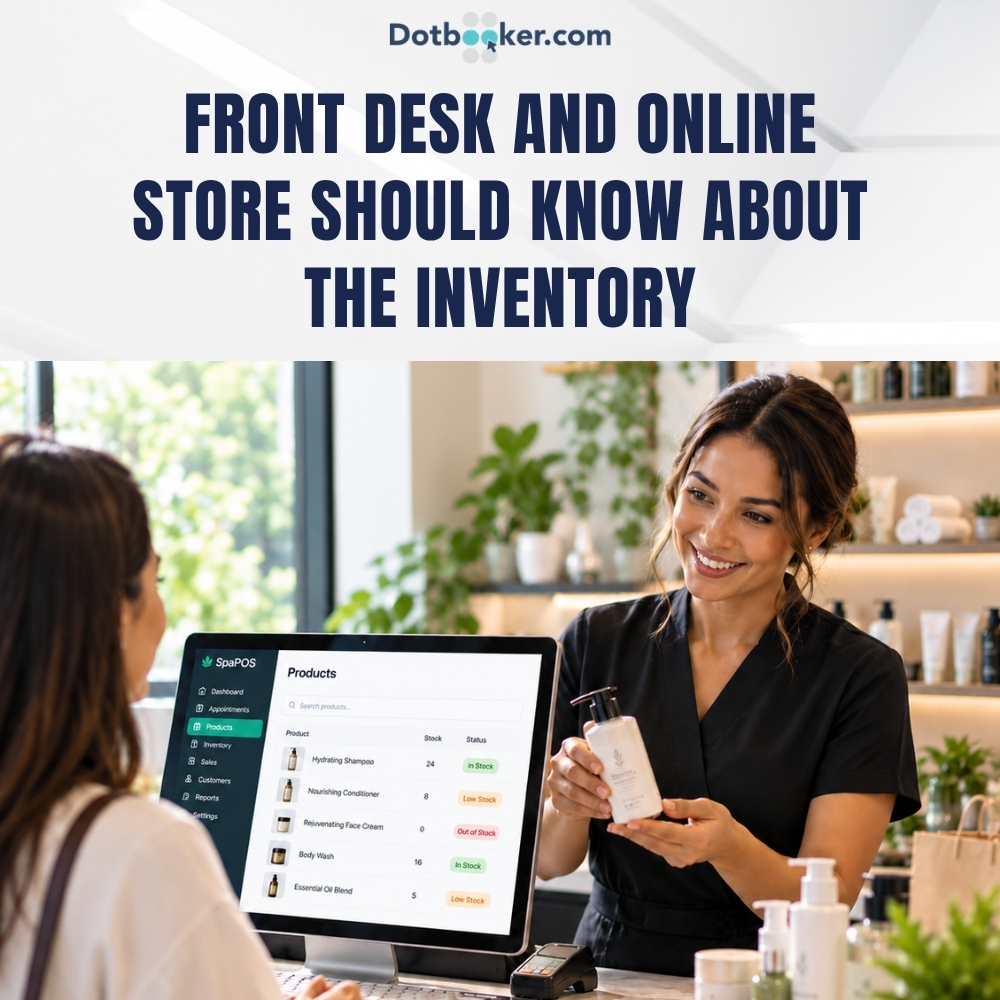
A customer finishes a spa treatment and walks to the front desk.
They like the shampoo used during the service and ask if they can buy one. The receptionist checks the shelf, finds the product, completes the sale, and moves on to the next customer.
That sounds simple.
But what happens if the front desk does not know that the online store sold the last two bottles earlier that morning?
Now the customer has been told that the product is available when it is not.
For salons, spas, beauty businesses, and wellness businesses, this is one of the less visible problems of selling services and products at the same time. The business may have one team handling appointments and treatments, another person handling the front desk, and an online channel selling retail products.
The customer sees one business.
The stock, if managed separately, can look like several different businesses.
This is where POS inventory management becomes useful. When sales and inventory are connected, every completed transaction can contribute to a more accurate view of what is still available.
For Cayman service businesses that sell professional products alongside appointments, this connection can make the checkout experience much easier to manage.
Service Businesses Often Run Two Businesses at Once
A salon may earn revenue from haircuts, styling and treatments while also selling shampoos, conditioners, and styling products. A spa may provide massages and facials while selling skincare products. A beauty business may offer treatments while also selling cosmetics and accessories.
In other words, these businesses often manage services and retail at the same time.
The service side revolves around appointments, staff schedules, and customer visits. The retail side revolves around products, quantities, variants, and sales. The two sides eventually meet at the checkout.
This is why a salon POS software solution can be useful beyond simply processing payments. When the product sale relates to inventory, the transaction can also update the quantity available for the next customer.
The same principle applies to a Spa POS system. A customer may book a treatment, receive the service, and then purchase a product recommended during the visit. The business needs to manage the service and product sale without creating separate records for each part of the experience.
Inventory stock features connect inventory with sales transactions and provides tools for monitoring stock, products, and inventory movement.
What Should the Front Desk Know About Stock?
Front-desk employees do not need to manage the entire inventory operation. They need access to information that helps them serve customers.
At the time of sale, the employee should be able to determine whether the requested product is available, which variant the customer wants and what price should be charged.
They may also need visibility into whether an item is running low or whether a particular product is no longer available.
When this information is connected to checkout, employees can spend less time searching for answers and more time assisting customers.
An Inventory POS system can bring product and stock information closer to the transaction itself, making the checkout process easier to manage.
What Should the Online Store Know?
The online store needs the same basic stock information as the front desk. Imagine a customer visiting the spa website late at night and finding a skincare product they want. They place an order because the website shows the item as available.
If the physical store sold the last units earlier that day, but the online stock was not updated, the business now must contact the customer and explain the problem.
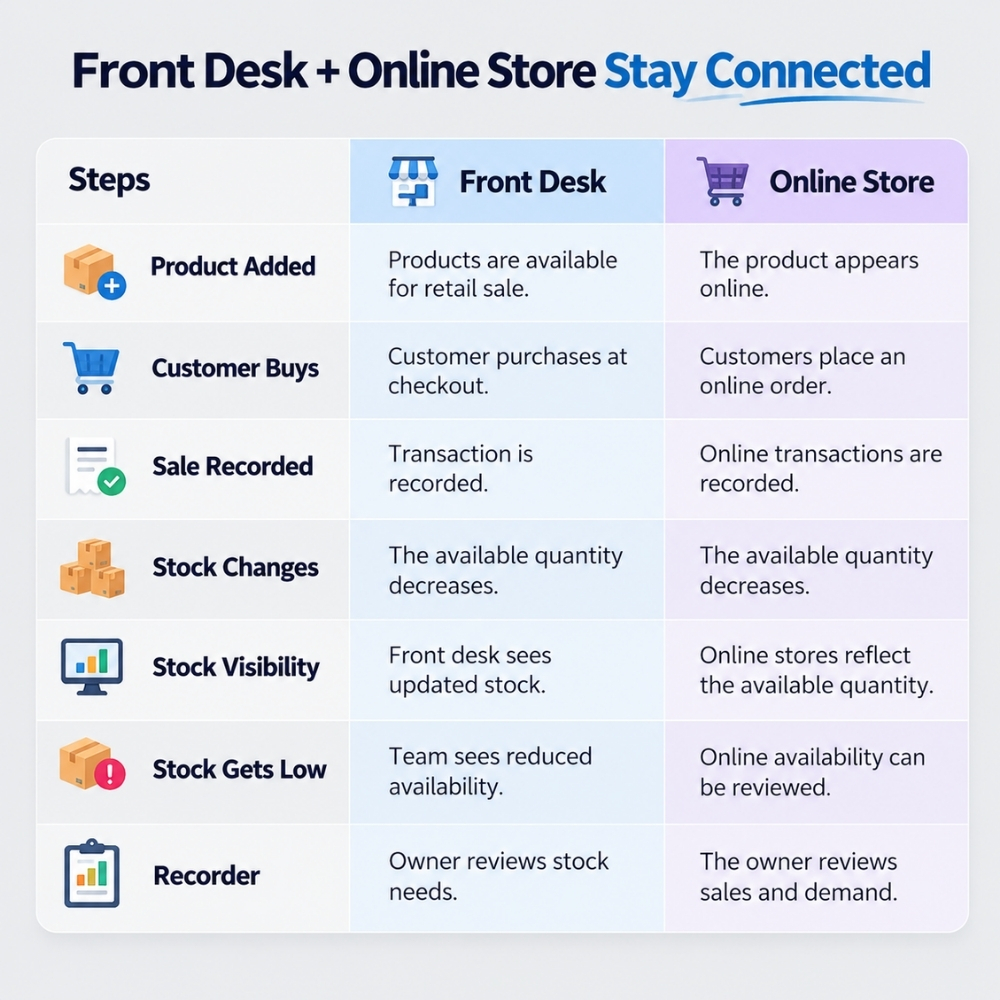
That creates unnecessary friction. A connected inventory process can help the online store and physical checkout work from a more consistent stock position. When a product is sold through one channel, the inventory record can reflect that movement for the business.
This becomes increasingly important when a service business sells through both an online store and a physical front desk.
What Should Owners Review Regularly?
Owners do not need to manually inspect every transaction to understand their inventory. What matters is having a useful view of sales and stock patterns.
Regular reviews can include which products sell most often, which items are approaching low stock, which variants are moving quickly and which products have remained on the shelf for longer.
Owners can also look at whether certain products are commonly purchased after services. This can reveal useful connections between service demand and retail demand.
For example, if a particular facial consistently leads to purchases of the same skincare product, that information can help the business plan future stock levels.
A salon POS software setup that connects sales with inventory can make these patterns easier to review.
What Happens When Sales and Stock Live Separately?
The problem usually does not appear with one sale. It appears when several transactions happen across different channels.
Imagine a Cayman spa starts the morning with 10 bottles of a popular skincare product. Two bottles are sold at the front desk, three are purchased through the online store, and one is used as part of a service. If these transactions are tracked separately, the front desk may still believe that more stock is available than existing.
This can lead to an awkward customer experience. A customer may place an online order only to discover that the product is unavailable. A receptionist may promise a product that has already been sold. An owner may reorder too late because the stock information was not updated quickly enough.
The issue is not always that the business has too little inventory. The issue can be that different parts of the business are working from different information.
An Inventory POS system can help connect sales with stock movement so that a completed transaction contributes to the latest recorded inventory position.
Connect Every Sale to Stock Movement
The basic process should be straightforward:
Product sold → Sale recorded → Stock updated → New quantity visible
When this happens through one connected process, the front desk does not have to rely on memory or manually check several records before completing a sale.
Front-Desk Retail
The front desk is often where the service and retail sides of a business meet. A customer finishes a treatment, asks about a product, and wants to purchase it immediately.
Instead of searching through a spreadsheet or asking another employee to check the shelf, the receptionist should be able to check the product and complete the transaction as part of the normal checkout process.
Once the sale is recorded, the stock quantity should reflect that movement.
This is where POS inventory management becomes part of customer service. The system is not simply counting products in the background. It is helping employees answer a customer's question at the moment it matters.
Service-Related Products
Products can also be closely connected to the services a business provides.
A spa might use a particular skincare product during a facial and sell the same product to customers afterward. A salon might use a styling product during treatment and recommend it for home use.
This creates an opportunity to connect the service experience with retail without making the customer journey feel forced.
The employee can recommend a relevant product, check its availability, and complete the sale while the inventory record is updated through the transaction.
Product Variants Make Stock More Complicated
Inventory becomes harder to understand as the number of products and variants increases.
Consider a salon selling shampoo. It may have three sizes and several formulas. The business does not really have one stock quantity. It has multiple quantities that need to be understood separately.
This is where POS inventory management can give the front desk more useful information than a simple product list.
The owner can see which versions are moving quickly, while staff can check the specific product a customer wants. This can also help when reviewing purchasing decisions because a business may discover that one size or variant sells much faster than another.
For a growing Cayman beauty or wellness business, this level of visibility can become increasingly useful as the product range expands.
Use Checkout as a Customer-Service Moment
Checkout does not have to be the point where the customer journey ends. It can also be a natural opportunity to connect a service with a relevant product.
Imagine a customer has just completed a facial. The therapist has recommended a particular skincare product, and the customer asks whether it is available for purchase.
The front desk checks the product, confirms the price, and completes the sale.
The customer gets what they were looking for without another conversation or a separate online search. The business records the transaction, and the stock position changes accordingly.
If customer history is also connected to the process, the business can maintain a clearer record of previous services and purchases.
The goal is not to push products after every service. It is to make relevant recommendations easier when they genuinely make sense to the customer.
Why Does Retail Inventory Management Matter for Service Businesses?
Retail inventory management is not only relevant to large retail stores. It can be just as useful for a salon with a few shelves of products or a spa selling a small range of skincare items.
The questions are still the same:
- What products are available?
- Which ones are selling?
- What is running low?
- Which products need to be reordered?
- Which items are sitting for too long?
When these answers are available without extensive manual checking, owners can make purchasing decisions with greater clarity.
For example, a spa may discover that one skincare product sells consistently after a particular treatment while another product rarely moves. That information can help the owner review purchasing quantities and product selection.
The inventory feature includes stock monitoring, inventory reporting, and tools for reviewing product movement.
Can POS and Inventory Work Together?
Yes, and this connection can be especially useful when products are sold during service checkout.
A customer books a service, receives the treatment, decides to purchase a recommended product and completes the transaction at the front desk. The service and retail activities are different, but they are part of the same customer journey.
A Spa POS system can help bring the retail transaction into that journey, while the inventory side records the product movement.
The same applies to salons. A customer might book a haircut, purchase styling products, and return later for another service. When appointments, customer information, sales, and inventory are connected, the business has a clearer record of the overall relationship.
How Can Better Stock Visibility Improve the Customer Experience?
Customers usually do not think about inventory systems.
They simply expect the product they are buying to be available.
That makes accurate stock information an invisible part of good service.
When the front desk knows what is available, employees can answer questions quickly. When the online store reflects current stock, customers can make purchases with greater confidence. When owners can see which products are moving, they can plan replenishment before a popular item becomes unavailable.
Technology stays in the background.
The customer experience stays in the foreground.
One Business Should Not Have Two Versions of Its Stock
For Cayman salons, spas, beauty businesses and wellness businesses, selling products alongside services creates another layer of daily operations.
The front desk needs to know what is available. The online store needs accurate product information. Owners need to understand sales and stock movement. Customers simply want to purchase the product they were promised.
POS inventory management connects these needs by linking product sales with inventory movement. Instead of treating the front desk, online store and stock records as separate activities, businesses can create one clearer flow:
Service → Recommendation → Product Sale → Stock Update → Customer History
Dotbooker brings POS, inventory, product management, product variants, client management and reporting together to help service businesses manage both appointments and retail activity from one platform.